
Insurance Lead Marketplace for Independent Agencies
Buy, manage, distribute, and measure insurance leads from one agency desk.
QuoteMasters HQ gives independent agencies one marketplace window for lead sources, routing, follow-up, and performance. Selection, ownership, and dispositions stay next to Customer CRM and Quote Desk — not in a separate buyer portal your floor forgets to open.
QuoteMasters HQ is insurance agency software for independent agencies in the United States. A Michigan agency is one closed-alpha example, not a geographic limit. Review Before You Renew is a separate Michigan consumer review service.
What to look for in an insurance lead marketplace
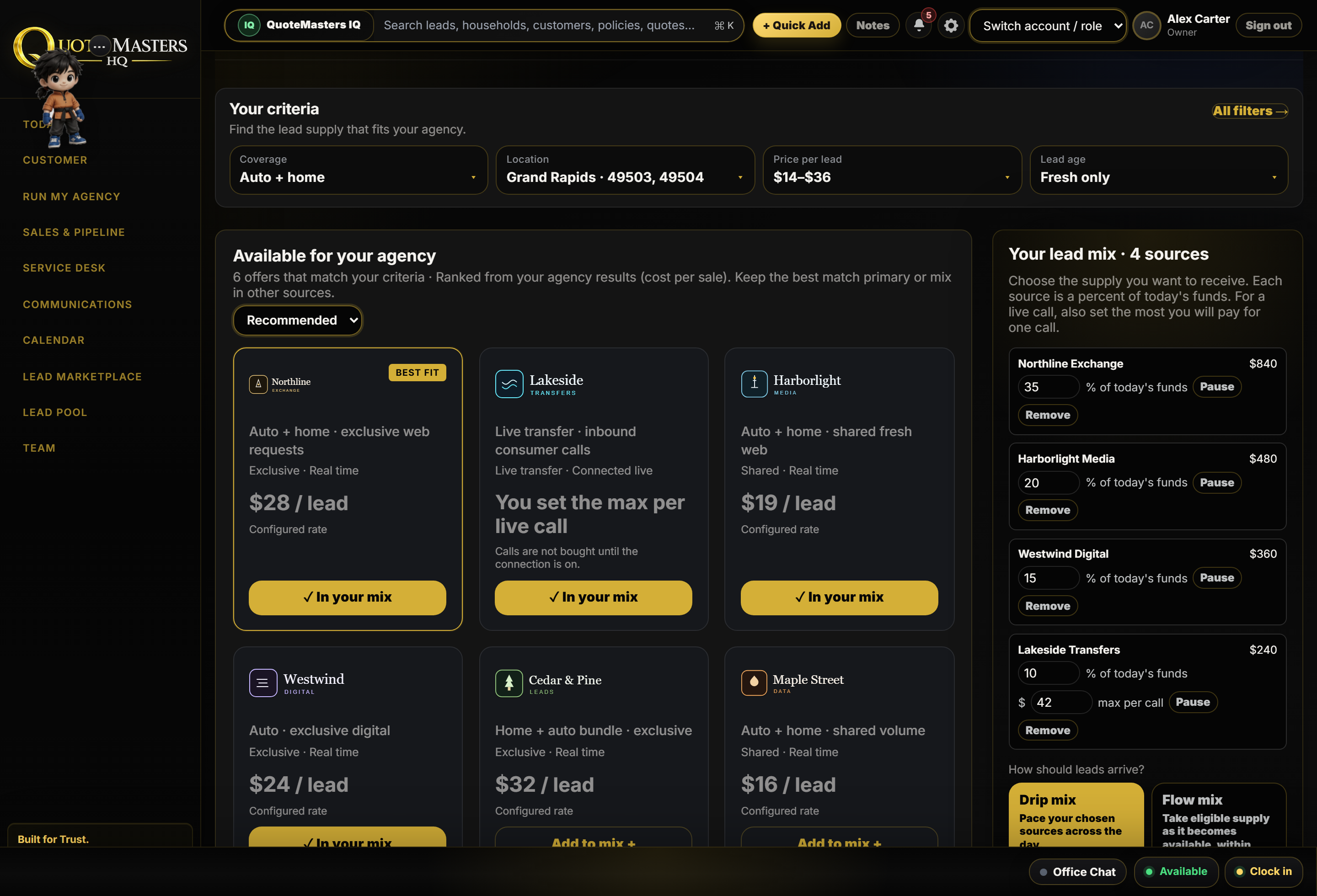
An insurance lead marketplace should put source choice, routing, and outcome data on the same desk the floor already opens. Closed-alpha agencies already buy and work interest inside QuoteMasters HQ. Early Access is how new agencies review the live screens and give feedback on mix controls still being finished — filters for line, ZIP, profile, budget, lead type, and source apply only where the product supports them.
Sources in one place, next to Quote Desk and Customer CRM
Mix controls you can actually set: line, ZIP, profile, budget, lead type, and source, where supported
Routing to a producer, a telemarketer, or a blend, with a named owner
Purchase, follow-up, disposition, and reporting attached to the same lead
A clear line between what is live today and what Early Access is still shaping
One marketplace window for sources, routing, and results.
Agencies access and manage lead sources from one place inside QuoteMasters HQ, then route work to agents, telemarketers, or blended workflows with disposition and performance reporting attached.
Access sources from one place
Agencies manage approved lead supply inside QuoteMasters HQ instead of juggling vendor logins beside the operating system.
Set mix and preferences you control
Where the product supports it, agencies shape lead type, line, geography (including ZIP), desired customer profile, budget, and source preferences before volume lands on the floor.
Route to agents, telemarketers, or both
New interest can go to producers, QuoteMasters-employed telemarketing pods, or blended workflows with ownership visible on the desk.
Connect purchase → follow-up → reporting
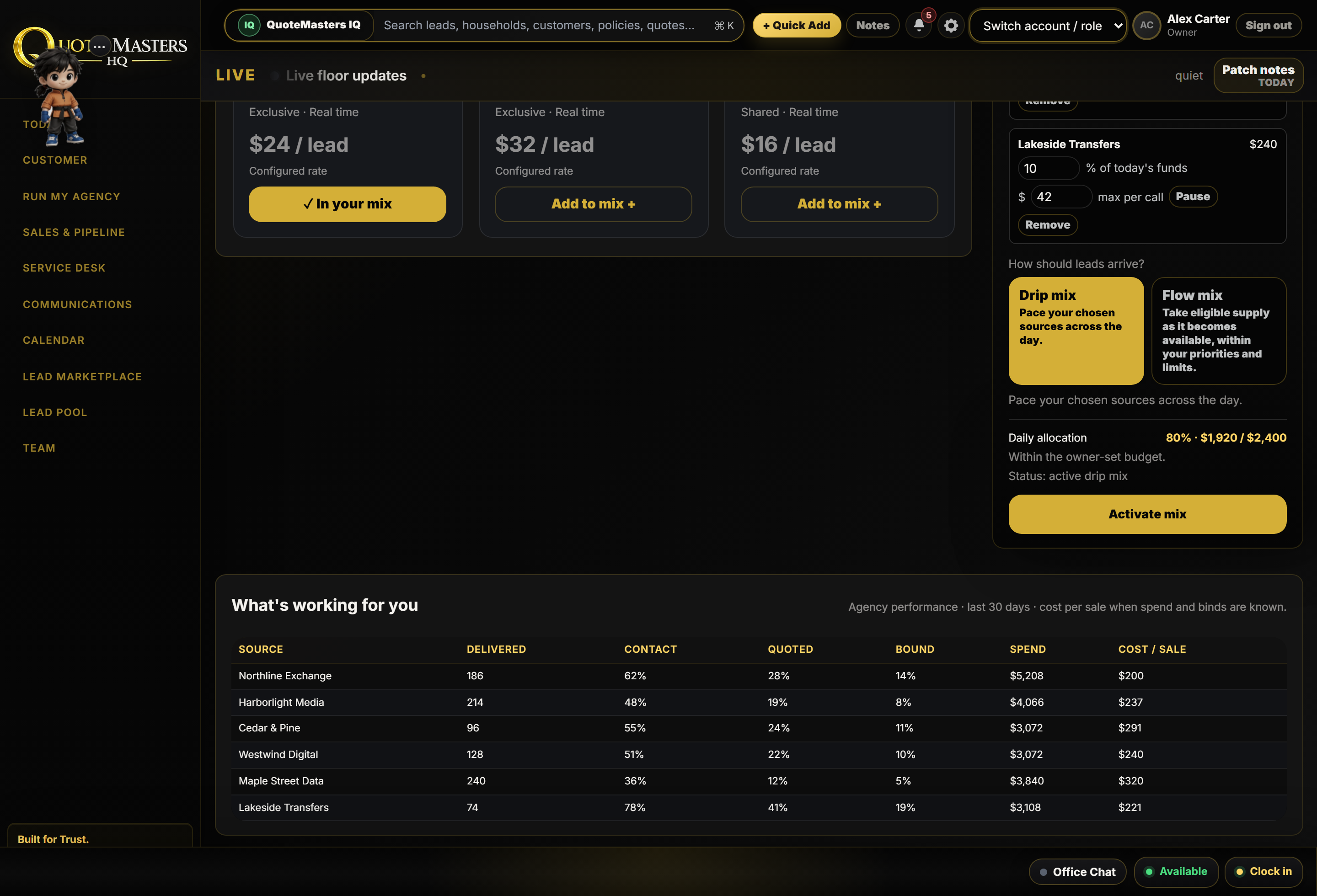
Disposition data, contact status, and pipeline movement stay attached to the lead so owners can see which sources produce contacted work — not just purchased volume.
From mix selection to measured follow-up.
1Select and budget
Choose the mix your agency wants to run — exclusive, shared, or live transfer supply where available — with budget and source preferences tied to the same desk.
2Intake and ownership
Leads land with an owner, source tag, and waiting context so first touch is not a scavenger hunt across email and vendor portals.
3Distribute and dial
Route to the right agent or telemarketer. Optional live pods and Jessica AI telemarketing work inside the same system when you need more dial capacity.
4Measure outcomes
Track contact, quote progress, and dispositions back to source so next month’s buy decisions use floor data, not guesswork.
Marketplace screens agencies already work from.
Lead purchase, ownership, and dispositions sit next to Quote Desk and reporting — the same login used for CRM, dialing, and training.
Insurance lead marketplace questions
What is an insurance lead marketplace?
An insurance lead marketplace is where agencies access and manage lead sources in one place, then route and follow those leads with ownership and outcome data — instead of buying into disconnected vendor portals.
Can agencies control their lead mix?
Yes, within what the product supports. Agencies can set preferences around line, ZIP / geography, desired customer profile, budget, lead type, and source choices so volume matches how the floor can work it.
Can leads be routed to agents or telemarketers?
Yes. QuoteMasters HQ supports routing to licensed agents, QuoteMasters-employed telemarketers, or blended workflows, with ownership visible to managers.
How does QuoteMasters HQ track lead performance?
Purchase, follow-up status, dispositions, and pipeline movement stay connected on the lead. Owners can review which sources produce contacted and quoted work inside the same operating system.
Connect buying to management, distribution, and staffing.
Related platform pages
Related guide articles
- From purchase to bound policyHow lead management should connect buy → follow-up → bind.
- Cost per bound policyA practical way to judge purchased insurance lead spend.
Related proof
- Michigan agency case studyOne OS instead of scattered lead portals and spreadsheets.
- Working-alpha proofOperator comments and closed-alpha context.
See how agencies select sources, route leads, and measure follow-up inside QuoteMasters HQ.
Supply into the same marketplace agencies use.
Approved vendors get Vendor Desk: leads, transfers, disposition, and recordings next to agencies already on HQ. Your price stays yours.
- One desk. Exclusive leads, shared leads, live transfers, ads, and payout. You do not need a second system for the agencies on HQ.
- Disposition and recordings. See what happened on the calls you sent, split by agency. Play your recordings. Download PDF, CSV, or Excel.
- Turn a tree on or off. Each client flips a connected source on or off. On means it can ping them. Off means we do not bid. We are not reselling someone else’s tree.
1Apply
Tell us company, contact, products, geos, supply types, and volume so Pagemaster can review.
2Review
HQ reviews fit for the marketplace. Approval is not instant and not automatic.
3Vendor Desk access
If approved, staff provision your vendor org, Owner login, packages, and ping key in Vendor Desk.
No open self-signup. Applications go to QuoteMasters HQ for review and provisioning.
Book a marketplace walkthrough
See source mix, routing to agents or telemarketers, and performance reporting inside QuoteMasters HQ.